 SnapNuvo
Spam calls · October 20, 2026 · By Robert
How to stop spam calls on iPhone: 4 free steps, then what we pay for
Start with the free settings. They cost nothing and they catch a lot. If the calls keep coming after that, here's the paid screener we use and exactly what it caught on our phone in 30 days.
Why it feels like it's getting worse
It isn't just you. Americans got about 52.5 billion robocalls in 2025, barely 1% fewer than 2024, according to the YouMail Robocall Index. That's roughly 140 million a day. And the FTC took in more than 2.6 million Do Not Call complaints in its 2025 fiscal year, most of them about recorded robocalls, per its Do Not Call Data Book. The top topics were debt relief, impostors, and medical or prescription offers.
4 free ways to stop spam calls on iPhone, in this order
1. Turn on Apple's unknown-caller screening
Go to Settings > Apps > Phone and find Screen Unknown Callers. You get three choices, per Apple's support page:
- Ask Reason for Calling: your iPhone asks unknown numbers who they are before it rings. A good middle ground.
- Silence: unknown numbers go straight to voicemail. The most aggressive option. You'll miss the pharmacy and the delivery driver too.
- Never: everything rings, like before.
Apple notes that calls aren't screened while you're roaming, and screening turns off for 24 hours after you call emergency services.
2. Turn on your carrier's free spam filter
All three big carriers have a free tier: AT&T ActiveArmor, Verizon Call Filter, and T-Mobile Scam Shield. Download your carrier's app and switch on spam blocking. This catches calls before they reach your iPhone's own filter.
3. Put your number on the Do Not Call list, but know what it does
Register at donotcall.gov. It's free and it never expires. It stops legitimate telemarketers. It does not stop scammers, because they're already breaking the law. That's why the list has about 258 million numbers on it and the calls still come.
4. Report the ones that get through
Report scam calls at reportfraud.ftc.gov. One report won't stop your calls. Enough reports are how the FTC picks its cases. Never press a number to "be removed." That tells the caller your line is live, and you'll get more calls, not fewer.
What we did when that wasn't enough
We pay for Cloaked, which has a call screener called Call Guard. Here's our own screen for the 30 days before October 20, 2026:
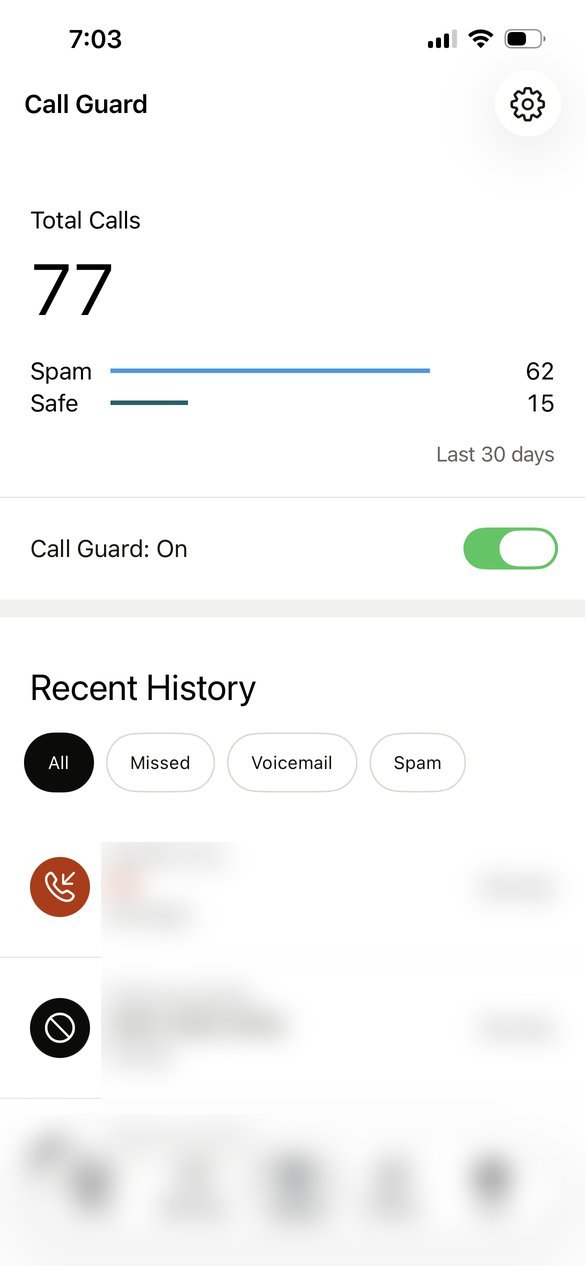
| Calls in 30 days | 77 |
|---|---|
| Flagged as spam | 62 (about 4 in 5) |
| Let through as safe | 15 |
| Plan we use | Individual plan, paid yearly |
It isn't perfect. Once it flagged a call from a saved family contact as spam. Check the spam list now and then, the same way you'd check an email spam folder.
Cloaked also removes your details from data-broker sites, which is often how spammers got your number in the first place. If you only want the call blocking, try steps 1 to 4 for a couple of weeks first. They're free.
Want to see what's out there about you first? Cloaked has a free exposure scan before you pay anything.
Run Cloaked's free scan →May earn SnapNuvo a commission
Common questions about stopping spam calls on iPhone
Does the iPhone have a built-in spam call blocker?
Yes. Screen Unknown Callers, in Settings > Apps > Phone, can ask unknown callers who they are or send them straight to voicemail. Your carrier's free filter adds a second layer before the call reaches your phone.
Does the Do Not Call list stop spam calls?
It stops legitimate telemarketers, not scammers. Scam callers are already breaking the law, which is why the list holds about 258 million numbers and the calls still come.
Will I miss real calls if I silence unknown callers?
You can. Silence sends every unknown number to voicemail, including pharmacies and delivery drivers. Ask Reason for Calling is the middle ground: unknown callers have to say who they are before your iPhone rings.
Should I press a number to be removed from a robocall list?
No. Pressing anything tells the caller your line is live, and you'll usually get more calls. Hang up and report the number at reportfraud.ftc.gov.
Related: Is Cloaked worth it? What it did on our account
Sources
- YouMail Robocall Index 2025 totals, via Telecompetitor, January 2026
- FTC, National Do Not Call Registry Data Book FY2025, December 2025
- Apple, Manage unknown callers on iPhone
- Our own Cloaked account, Call Guard screen, checked October 20, 2026