 SnapNuvo
Spam calls · October 23, 2026 · By Robert
How to stop spam calls on Android: Google and Samsung settings, then what we pay for
To stop spam calls on Android, turn on the spam filter that's already in your Phone app. It's one menu on a Pixel and one on a Samsung, and both are below. Then add your carrier's free filter. If calls still get through, here's the paid screener we use: it flagged 62 of the 77 calls on our phone in 30 days.
First, which Phone app do you have?
Android phones don't all use the same dialer. Pixels and many Motorola and OnePlus phones use Google's Phone app (a blue phone icon, "Phone by Google" in the Play Store). Samsung Galaxy phones use Samsung's own Phone app. Open your dialer, tap the three dots in the top corner, and look at Settings: if you see Caller ID and spam, follow the Google steps. If you see Caller ID and spam protection, follow the Samsung steps.
How to stop spam calls on Android with the Google Phone app
These steps come from Google's Phone app help page:
- Open the Phone app.
- Tap More options (three dots) > Settings > Caller ID and spam.
- Turn on See caller ID & spam. Suspected spam now shows a red warning when it rings.
- Turn on Filter spam calls if you never want suspected spam to ring at all.
To block one number, open Recents, tap the call, and choose Block or Report spam. Reporting helps Google's filter learn. On newer Pixels with Call Screen, Google handles spam blocking from the Call Screen settings instead, so look there if the switch above is missing.
How to block spam calls on Samsung
Samsung calls this Caller ID and spam protection. Per Samsung's support page:
- Open the Phone app and tap More options (three dots) > Settings.
- Tap Caller ID and spam protection and switch it on. Accept the terms the first time.
- Tap Block spam and scam calls and pick one: Block all spam and scam calls, or Only block high-risk scam calls.
"Only high-risk" is the safer start if you get calls from doctors' offices or delivery drivers. Samsung says the feature may not be available on every carrier or model.
The catch: filtered calls don't ring or notify you
This is the part most guides skip. Google says calls caught by Filter spam calls don't ring and don't send a notification. They still land in your call history and voicemail. That's good for robocalls and bad for the one real call the filter guesses wrong. Make a habit of glancing at Recents once a week. We learned why the hard way below.
3 more free steps that work on any Android
1. Turn on your carrier's free spam filter
AT&T ActiveArmor, Verizon Call Filter and T-Mobile Scam Shield all have a free tier. Your carrier filters before the call reaches your phone, so it's a second layer on top of the Phone app.
2. Join the Do Not Call list, and know its limit
Register at donotcall.gov. It's free and it doesn't expire. It stops legitimate telemarketers, not scammers, which is why the FTC still logged more than 2.6 million Do Not Call complaints in its 2025 fiscal year (FTC Data Book).
3. Report the ones that slip through
Report scam calls at reportfraud.ftc.gov. Never press a number to "be removed." It tells the caller your line is live. Americans got about 52.5 billion robocalls in 2025, per the YouMail Robocall Index, so the callers are counting on someone pressing 1.
What we use when the free filters aren't enough
We pay for Cloaked, which includes a call screener called Call Guard. Here's our own screen for the 30 days before October 20, 2026:
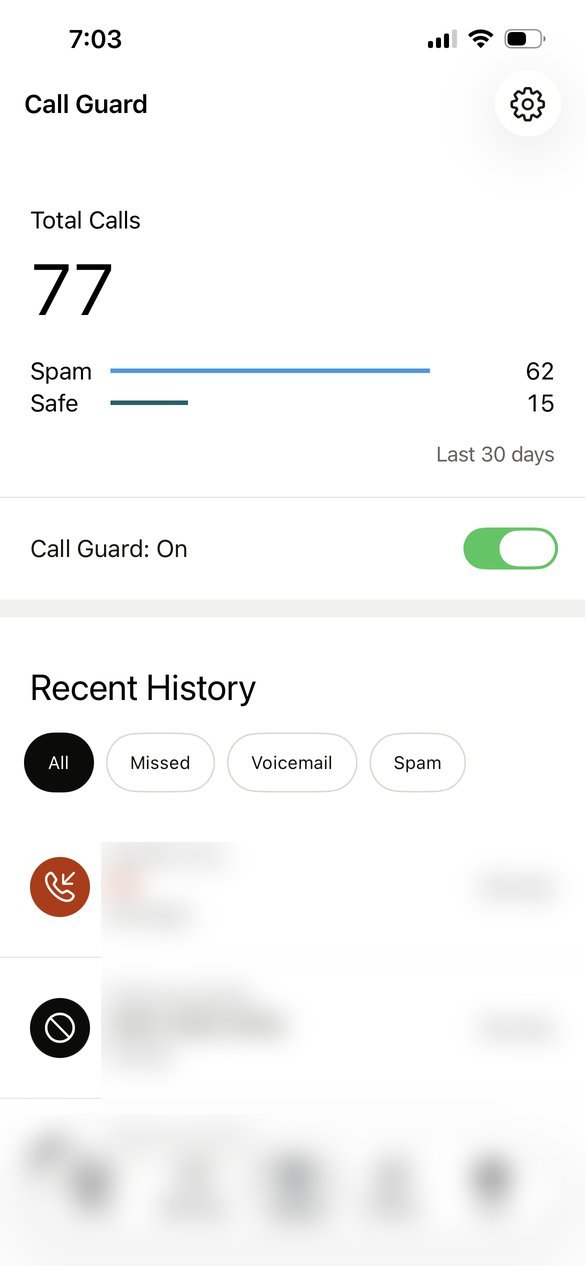
| Calls in 30 days | 77 |
|---|---|
| Flagged as spam | 62 (about 4 in 5) |
| Let through as safe | 15 |
| Plan we use | Individual plan, paid yearly |
It isn't perfect. Once it flagged a call from a saved family contact as spam, which is exactly the filtered-call catch above. We check the spam list now and then, like an email spam folder.
Call Guard does work on Android, with a few conditions from Cloaked's setup guide: Cloaked has to be set as your default phone and spam app, it's US only, Google Fi isn't supported, and you should switch off other call blockers (including Verizon Call Filter) so they don't fight each other. That means it replaces the Google or Samsung filter above rather than stacking with it.
Cloaked also secures your details on data-broker sites, which is often how spammers got your number in the first place. If you only want the call blocking, give the free settings two weeks first.
Want to see what's out there about you first? Cloaked has a free exposure scan before you pay anything.
Run Cloaked's free scan →May earn SnapNuvo a commission
Common questions about stopping spam calls on Android
Does Android have a built-in spam call blocker?
Yes. On the Google Phone app, Caller ID and spam can flag suspected spam and filter it so it never rings. Samsung phones have Caller ID and spam protection in the Samsung Phone app, with a setting to block all spam and scam calls or only high-risk ones.
Will I miss real calls if I filter spam on Android?
You can. Google says filtered spam calls don't ring and don't show a notification, though they stay in your call history and voicemail. Check Recents once a week for anything you were expecting.
How do I block unknown callers on Android?
In the Google Phone app, block a single number from Recents by tapping it and choosing Block or Report spam. Samsung's Phone settings have a Block numbers page with a switch to block unknown or private numbers that hide their caller ID.
Does the Do Not Call list stop robocalls on Android?
It stops legitimate telemarketers, not scammers, on any phone. Scam callers are already breaking the law, so register at donotcall.gov and still turn on your phone's filter.
Related: How to stop spam calls on iPhone · Is Cloaked worth it? What it did on our account
Sources
- Google, See caller ID and spam protection (Phone app help)
- Samsung US, Caller ID and spam protection
- Cloaked Help Center, Call Guard setup
- FTC, National Do Not Call Registry Data Book FY2025, December 2025
- YouMail Robocall Index 2025 totals, via Telecompetitor, January 2026
- Our own Cloaked account, Call Guard screen, checked October 20, 2026